|
(For help in turning off this feature click here)
Starting with version 7.2 of BusinessVision, each user may only
log on to a BusinessVision company once. This is true whether it be
on the same computer or on different computers.
There are actually good technical reasons for this. However, this
feature actually causes more trouble than good. Fortunately this unhelpful feature can be turned
off.
NOTE:
This is NOT how you log someone out of
BusinessVision. For that you must use the
Pervasive Monitor.
WHAT IS THE "USER LOG" anyways?
-
The User Log is a simple list of who is logged
into BusinessVision
-
The ONLY purposes of the User Log is to (b) prevent a
BusinessVision user from logging into BusinessVision
more than once, and (b) show you a list of who is
logged into BusinessVision (but this fails under
certain circumstances).
WHAT the User Log is NOT
-
The User Log is not a record of who has done what in
BusinessVision, nor is it a record of when users log
in and out.
-
The User Log is NOT a method for logging people
out of BusinessVision.
-
Deleting a BusinessVision user from the User Log
will not terminate their BusinessVision session, nor
will it free up the data files they are using. It
will NOT log them out of BusinessVision.
-
To log someone out of BusinessVision when their
BusinessVision program is not accessible, use the
Pervasive Monitor.
-
It is NOT a BusinessVision license monitoring
system.
-
For example, if you have seven people logged
into BusinessVision, clearing them all from the User
Log will LEAVE them all fully operational in
BusinessVision, with all the BusinessVision data
files still open. They will be able to continue
processing in BusinessVision as usual.
-
If you cannot get into System Setup or File
Reorganize because the program is telling you there
are users in BusinessVision, deleting users from the
User Log will NOT change that. You will STILL not be
able to get into those functions even if you clear
the User Log of all users.
PLEASE NOTE THAT THE USER LOG HAS ABSOLUTELY
NOTHING WHATSOEVER to do with the number of user
licenses available at any one time, nor with whether
users can access BusinessVision, nor with how many users
are in BusinessVision, nor with whether you can access
System Setup or certain other functions.
...EXCEPT for one and only one situation: If the “User
Log” is turned on then BusinessVision will not allow
that same user ID to log into BusinessVision more than
once simultaneously. That's it, nothing else! |
What is the problem with the User Log?
With the User Log feature turned on, a problem may arise if
BusinessVision terminates improperly, leaving the user still "logged
on", even though in reality they are no longer in the program and
not logged on. The software will still have the user listed as being
logged on in the "User Log Details".
When that user tries to log back on they won't be able to, and
will receive the message: "The user XXX is already logged onto this
Sage BusinessVision company. Please logon with a different user
I.D."
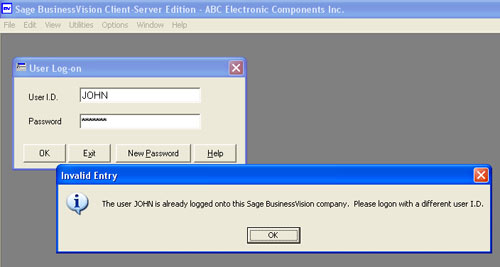
To rectify this problem, you need to log onto BusinessVision as a
different User (in this example, not as "JOHN", but as "WM"),
and clear the "stuck" user from the User Log.
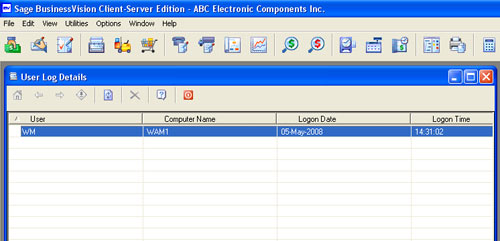
Then go to Utilities, User Log. There you will see a list of
logged-on users, along with the names of the computers on which they
are logged on.
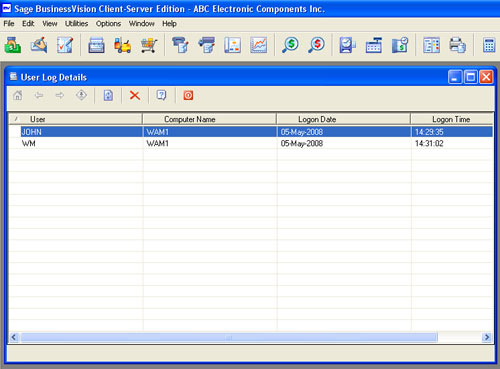
In this example the user "JOHN" is shown as being already logged
on, yet in reality he is not.
To fix this, simply highlight the User "JOHN" and click the "Delete"
button.
Please be sure you clear the correct user from this list. Otherwise
you run the risk of corrupting your BV data files by clearing a
logged-on user who is actually accessing the data.
What you are doing here will NOT delete the user, it just clears
them from the list of logged-on users.
**Nor does this free up any BusinessVision licenses.
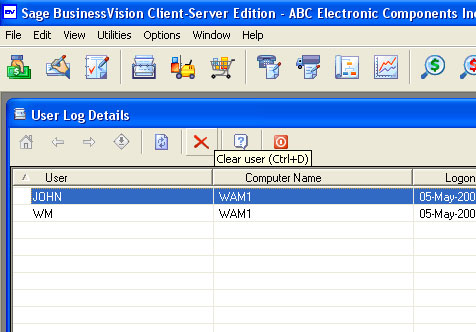
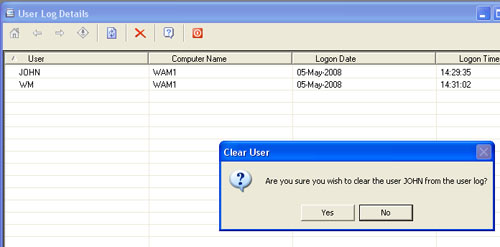
You will now see that user has been removed from the list of
logged-on users. They can now log back on to BusinessVision as
usual.
| Alternate method, to clear the entire User Log all at once This method requires knowledge of how to navigate in folders in Windows.
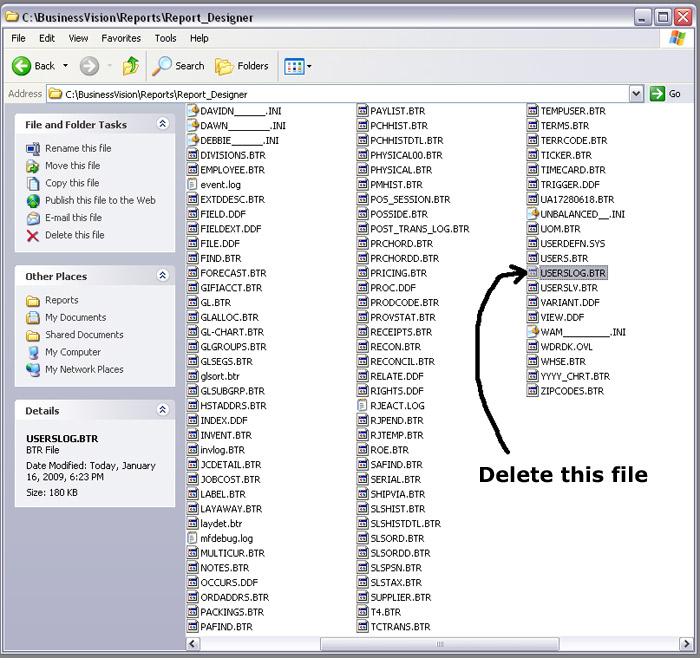
Using Windows Explorer, or via "My Computer", navigate to the folder where your BV data files are located.
Once there, locate and then delete the file USERSLOG.BTR. Be careful! If you delete the wrong file you may be
deleting important data in your BusinessVision company data.
Here is a sample screen. Your BV data will be in a different location.
|
How to turn off the User
Log
Once you update to v7.21, there will be an option available
within System Manger, System Setup to turn off this "feature".
This is recommended, due to the hassles that this feature causes.
Go to Company, General Settings. Note the new option, "Enable
user log".
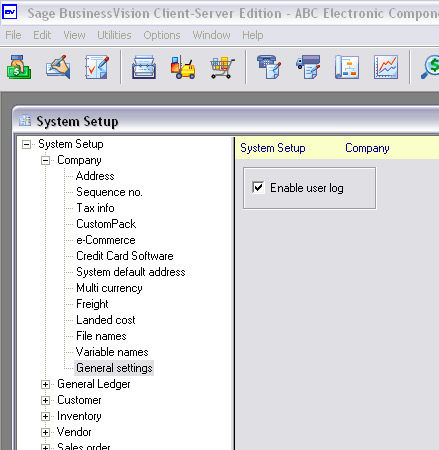
Clear the check box and save the changes.
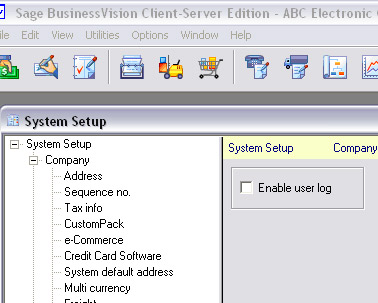
The software will now no longer keep a list of who is logged on.
|


